


Antistress Relaxing Mini Games
4.4243.00 Reviews
App Specs
- Version
- 0.0.5
- Updated On
- License
- Free
- Downloads
- 5,000,000+
- Developer
- CAT Studio
- Categories
- Casual
- Platform
- Android
Screenshots




 Analysis by AppCompare
I like a stress-relief game best when it lets me begin without a plan: tap once, get a small, satisfying response, then decide whether to continue or put the phone down. That simple loop is what makes Antistress Relaxing Mini Games appealing. It gathers casual activities meant for short, low-pressure breaks, so I can reach for it when I want something to do with my hands and attention without committing to a long game.
The appeal is in the small actions
There is no grand objective to work toward here. The draw is the immediate interaction: make a mark, spin or tap, hear or see a response, and repeat for as long as it feels pleasant. That kind of play suits the moments when a demanding puzzle or competitive match would feel like one more task. I can try an activity, notice whether its rhythm works for me, and move on rather than having to finish a level.
The game is a free casual title from CAT Studio, with a 4.5 average from around 7,900 ratings and over a million installs. It is rated for Everyone, which makes its general tone approachable for a broad audience. There are in-app purchases at $1.99 per item, so “free” describes the starting price, not necessarily every optional purchase. If I were installing it for a younger player, I would still check the purchase settings on the device rather than assume every part of the experience is free.
Feedback that keeps a break light
The activities are built around quick sensory feedback rather than challenge. In the sand drawing activity, for example, I can focus on the changing pattern as I move, without needing to produce a polished picture. That is a useful distinction: the point is the process, not a score or a result to show off. The virtual fidget spinner offers a different kind of repetition, while the xylophone shifts the interaction toward sound.
That variety matters because a soothing sound for one person can be distracting for another, and repetitive movement does not suit every mood. I would treat the app as a small menu of ways to occupy a few minutes, not as a guarantee that every activity will feel calming. If one interaction starts to irritate me, the sensible move is to switch activities or stop; the low-stakes format makes that easy.
When it fits into an ordinary day
I can imagine opening it during a short wait, after finishing a piece of work, or while taking a screen break that still involves the phone. A practical approach is to pick one activity before starting and use it as a brief transition, rather than scrolling through every option looking for the perfect one. That choice reduces the chance that a relaxing pause turns into aimless app browsing.
It is also worth being realistic about what a mobile game can do. This is a casual distraction, not a substitute for sleep, movement, a proper break from screens, or support when stress is persistent. The most useful role for it is modest: a quick change of focus when I want something uncomplicated. If I need quiet, I can avoid sound-based play; if I need to get away from the screen entirely, a physical fidget or a short walk is a better fit.
Worth Reading Before You Choose

EA SPORTS FC Mobile 26 Is a Bigger Football Game, but It Takes Time

Flipboard Shows What News Apps Must Do Beyond the Feed

Switching to Android Auto Means Rethinking Your Driving Routine

Google Calendar Makes a Crowded Week Easier to Manage

Ludo King Makes the Most of the Minutes Between Plans

Baby Panda World Brings Quick Play to Modern Phones, but Its Game Library Feels Busy
What to expect from the experience
The store summary describes a collection of mini activities, including pop-it-style and ASMR-oriented play. The title is currently version 0.0.5, and the game’s release date is December 9, 2025. Those details make it sensible to approach it as an early version rather than assume its selection and feel are set in stone. I would start with the activity that sounds most appealing, then judge the actual interaction for myself instead of expecting every mini-game to suit me equally.
For comparison, many casual games rely on levels, streaks, unlocks, or a steadily rising difficulty curve to give players a reason to return. This one’s appeal is more immediate: its basic loop can begin and end without a campaign to keep up with. That is a plus if I want a small, self-contained pause. It is a drawback if I enjoy clear goals, measurable progress, or the satisfaction of mastering a system. In that case, a puzzle game or a more structured casual title may hold my interest longer.
First Impressions and Design
When you first open Antistress Relaxing Mini Games, you’re greeted with a minimalistic and soothing interface. It’s not cluttered with unnecessary buttons or flashy graphics, which is exactly what you need when you’re trying to unwind. The design feels intentional, focusing on relaxation rather than stimulation. Everything is laid out simply, making navigation a breeze even if you’re not exactly tech-savvy.
A Variety of Games to Unwind
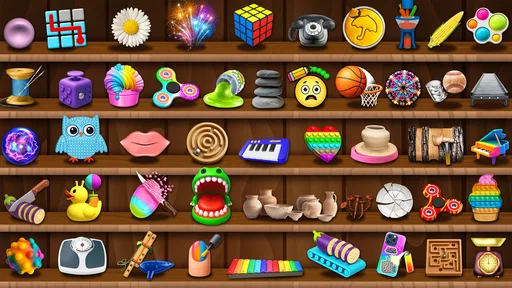
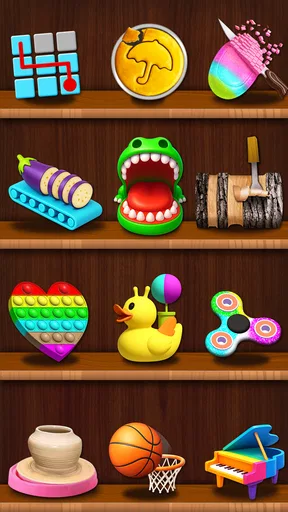
The app offers a wide range of mini-games, each designed to help you relax in different ways. From bubble wrap popping to zen gardens, there’s something here for every kind of stress relief. I personally found the sand drawing game to be incredibly therapeutic. There’s something oddly satisfying about creating patterns in the sand without the mess.
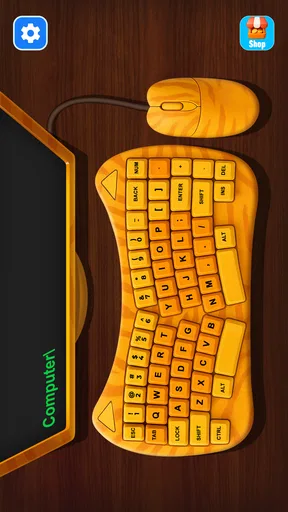
If you’re someone who enjoys tactile sensations, the fidget spinner game is a must-try. It’s amazing how a simple digital spinner can capture your focus and help you zone out. The app even includes a virtual xylophone, perfect for those who find solace in music. Each game offers a unique way to relax, so you can switch things up depending on your mood.
User Experience and Accessibility
One of the standout features is how user-friendly the app is. The games load quickly, and there’s hardly any lag, which is crucial when you’re trying to relax and not get frustrated. Whether you’re using an Android or iOS device, the app performs beautifully across platforms.
For those worried about accessibility, the app doesn’t disappoint. It’s designed to be inclusive, with options to adjust sounds and effects to suit your preferences. Whether you want to play with sound or in silence, the choice is yours. This customization really enhances the overall experience, making it personal and effective for stress relief.
What Makes It Stand Out?
Unlike other stress-relief apps, Antistress Relaxing Mini Games keeps things simple. There are no complicated levels or competitive elements, which means you can fully relax without feeling any pressure. It’s like the app knows exactly what you need and delivers it in the simplest way possible.
Another feature worth mentioning is the app's lack of intrusive ads. While many free apps bombard you with ads at every turn, this one keeps them to a minimum. It’s refreshing and makes a huge difference when you’re trying to unwind. You can focus on the games without constant interruptions.
Choosing the right moment to play
A useful way to get value from this kind of collection is to match the activity to the break, instead of expecting one mini-game to work in every situation. If I have only a moment between calls, a quick tap-based interaction is easier to leave than an activity that invites me to keep experimenting. If I have a longer pause, drawing patterns in the sand gives me something to concentrate on without turning the break into a task with a right answer.
There is a small trade-off in having several options: choice can make the first minute less relaxing if I keep switching in search of the ideal one. I’d try a simple personal rule—choose one activity, give it a little attention, and change only if it is not enjoyable. That makes the collection feel more like a set of tools than another feed to browse. It also gives me a clearer sense of which kind of feedback I actually find calming: visual repetition, a tactile-style gesture, or sound.
Who will enjoy it, and who may not
I’d recommend it to someone who likes casual play but does not want to track a score, maintain a streak, or learn a complicated control scheme. It can also suit people who want a small activity to fill a quiet wait, or who enjoy sensory toys but would rather have a digital option at hand. The broad, low-pressure idea makes it easy to sample without needing a gaming background.
I would skip it if the main reason I play games is to beat a challenge, unlock a sequence of rewards, or make visible progress over time. The same goes for anyone who finds phone-based sensory effects more stimulating than soothing. In those cases, a physical fidget item, a paper doodle, or a focused puzzle is likely to be more satisfying. A digital spinner cannot reproduce the feel of a real object, and a screen-based pause is not ideal when the goal is to rest my eyes.
For a realistic everyday use, I’d keep it as a short reset after a concentrated stretch of work: open one activity, make a few patterns or taps, then close the game before returning to the task. I would not use it as background noise while trying to work, because the point is to give my attention a brief, deliberate change of direction. Keeping the session intentional makes it easier to enjoy the quick feedback without letting a short break expand by accident.
Small practical considerations
Before settling on an activity, I’d check whether its sound suits the place I’m in. A xylophone may be pleasant at home but awkward in a quiet waiting room, while a silent visual interaction may be easier to use discreetly. Headphones can help with sound in some situations, but I would not assume they are needed; the better choice is simply to use the option that fits the surroundings and my own preference.
It is also worth keeping expectations measured around variety and polish. The game is at version 0.0.5, so I would judge it by the activities available now rather than by imagining future additions. Its current strength is the ease of dipping in, not a deep catalogue to explore for hours. If the same interaction stops feeling fresh, that is a natural point to close it rather than a reason to push through.
One question people often have about a free game is whether they can use it without spending. The starting price is free, while optional in-app purchases are listed at $1.99 per item. I would treat any purchase as optional and decide whether it adds something I personally want before paying. Another practical question is whether it is appropriate for a family device: the Everyone rating indicates a general-audience age classification, but device-level purchase controls are still a sensible safeguard.
Where the simple loop succeeds—and where it stops
The best part of the design is how little it asks of me. An action produces an immediate response, that response gives me a small reason to repeat it, and I can end the session whenever the moment has passed. There is no need to remember where I left off. That makes the reset unusually clean: I can put the phone down and return later without feeling behind.
The same simplicity sets a limit. Without goals or a progression system, the reason to come back depends on wanting that particular kind of small sensory pause. I see that as an honest trade-off rather than a flaw to hide. For a few minutes of casual diversion, a straightforward loop can be exactly right; for a lasting hobby or a structured way to manage stress, I would look elsewhere.
Final Thoughts
All in all, Antistress Relaxing Mini Games is a delightful little app that does exactly what it promises. It offers a wide selection of activities that cater to various relaxation needs, all within an intuitive and visually calming interface. Whether you’ve got five minutes or an entire afternoon, this app is a great companion for de-stressing.
So, if you’re finding yourself overwhelmed by the daily grind, why not give it a try? It might just become your favorite digital escape. And let’s be honest, who doesn’t need a little more zen in their life?
Pros
- Wide variety of mini-games available.
- Easy-to-use interface for all ages.
- No internet connection required.
- Visually calming graphics and sounds.
- Regular updates with new content.
Cons
- Contains ads between games.
- Some mini-games can be repetitive.
- Limited customization options.
- No multiplayer features included.
- In-app purchases can add up.
FAQs for Antistress Relaxing Mini Games
What is Antistress Relaxing Mini Games?
Antistress Relaxing Mini Games is an app designed to help users unwind and de-stress through a variety of mini-games. These games are tailored to provide calming and soothing experiences, offering activities like drawing, popping bubbles, or playing with virtual toys. It's ideal for short breaks or moments when you need to relax.
Is Antistress Relaxing Mini Games free to download?
The app is free to download on both Android and iOS platforms. However, while many features are accessible without charge, some premium content or features might require in-app purchases. These purchases can enhance the gaming experience but are not necessary to enjoy the core offerings.
What types of mini-games are included in the app?
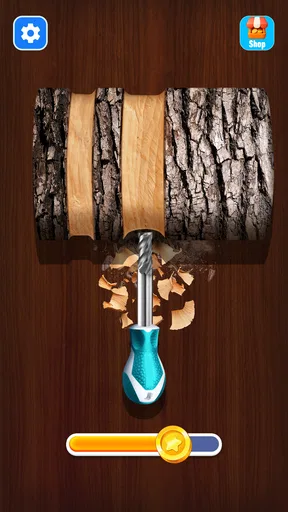
Antistress Relaxing Mini Games includes a diverse selection of activities designed to soothe and relax. Users can engage in games such as bubble wrap popping, coloring, wood carving, and even virtual fidget spinners. Each game is crafted to offer a calming experience, promoting relaxation and mindfulness.
Does Antistress Relaxing Mini Games require an internet connection?
While some features or updates may need an internet connection, most of the mini-games within Antistress Relaxing Mini Games can be played offline. This makes it convenient for users to enjoy a relaxing session anytime, anywhere, without worrying about connectivity issues.
Are there any age restrictions for using the app?
Antistress Relaxing Mini Games is suitable for all ages. Its simple and intuitive design makes it accessible for children, while its relaxing nature appeals to adults seeking stress relief. However, parents should be aware of potential in-app purchases when children are using the app.


